Polycom C16 Uživatelský manuál Strana 247
- Strana / 492
- Tabulka s obsahem
- ŘEŠENÍ PROBLÉMŮ
- KNIHY

- Design Guide 1
- C16, C12, C8, and SR12 1
- Trademark Information 2
- Patent Information 2
- Contents: 3
- Introduction 11
- Introduction 13
- SoundStructure Product Family 15
- C16 C12 C8 SR12 16
- # inputs 16 12 8 12 16
- # outputs 16 12 8 12 16
- # submixes 16 12 8 12 16
- OBAM™ - One Big Audio Matrix 17
- 16x16 12x12 8x8 18
- 36x12 36x8 18
- SoundStructure Installation 20
- C-Series Input Processing 21
- UNGATED - Bypass 25
- C-Series Matrix Crosspoints 26
- C-Series Output processing 27
- C-Series Submix Processing 28
- Local Room 29
- SR-Series 31
- SR-Series Input Processing 33
- Noise Cancelled 35
- SR-Series Output Processing 40
- Telephony Processing 41
- Physical Channels 46
- OBAM IIN OUT 48
- SoundStructure C16 49
- Device A 50
- Device B 50
- Device C 50
- Physical Channel Summary 53
- Virtual Channel Summary 55
- Virtual Channel Groups 56
- Telephone Virtual Channels 60
- Logic Pins 60
- Physical Logic Pins 61
- Chassis GroundChassis Ground 64
- IR Receiver Virtual Channel 67
- Creating Designs with 69
- SoundStructure Studio 69
- Step 2 - Output Signals 74
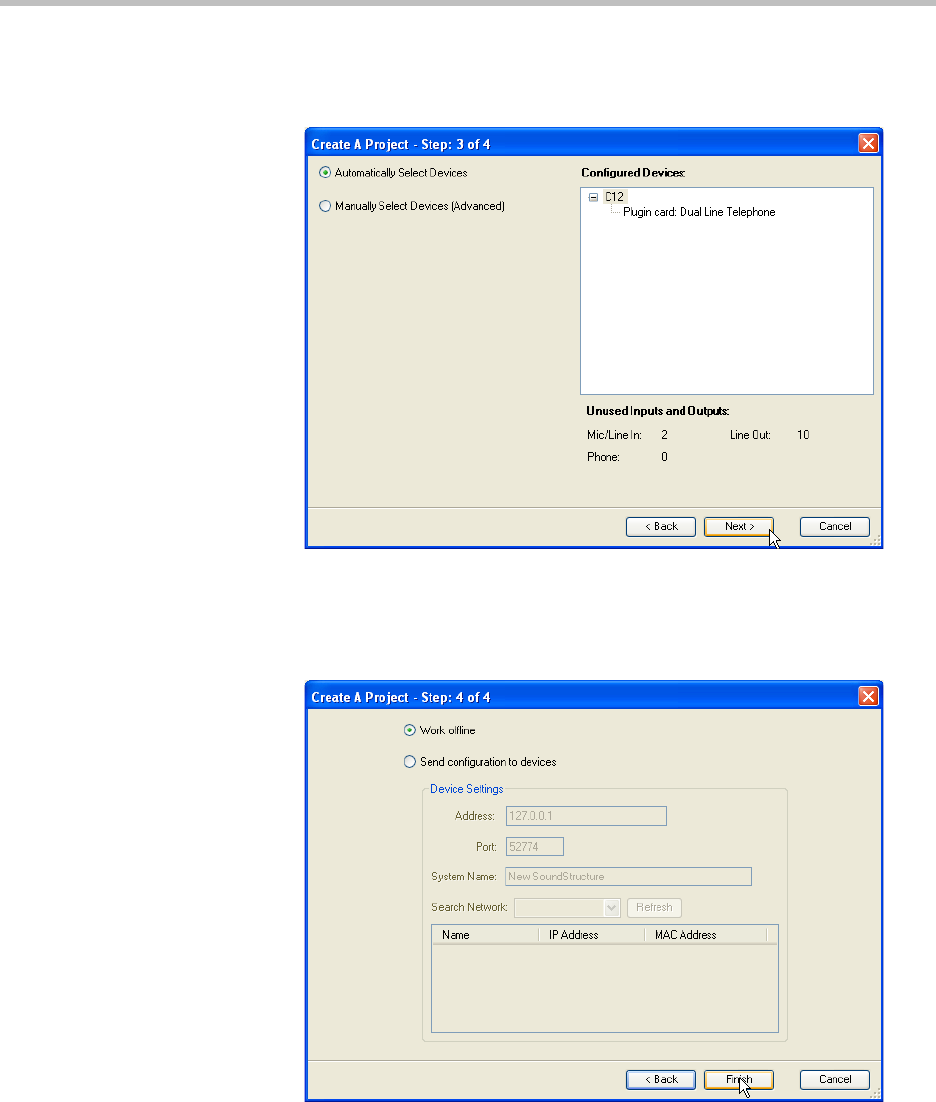
- Step 3 - Device Selection 75
- Online vs. Offline 78
- Wiring Page 81
- Edit Devices 84
- Editing Virtual Channels 87
- Monaural Stereo 88
- Input Signals 92
- Input Signal Meters 93
- Input Channel Controls 98
- Analog Signal Gain 99
- Phantom Power 100
- Ungated Type 101
- Favorite Content 103
- Delay Type 104
- Delay Compensation 106
- Equalization 108
- Feedback Elimination 110
- Recording/ 111
- Conferencing 111
- Reinforcement 111
- Noise Cancellation 113
- Automatic Gain Control (AGC) 114
- Dynamics Processing 115
- Input Level (dB) 117
- Output Level (dB) 117
- Threshold 117
- Automatic Microphone Mixing 119
- Signal Generator 125
- Output Signals 126
- Dynamics 127
- Submix Signals 130
- Matrix Page 132
- Adjusting Crosspoints 134
- Matrix summary 139
- Telephony Channels 140
- Input Gain 141
- Telephone Controls 145
- Physical Connections 149
- Polycom HDX Integration 150
- SoundStructure 151
- Inputs from 154
- Polycom HDX 154
- Outputs to 156
- Mute Control 157
- Volume Control 159
- Bottom ViewTop View 161
- Orientation 161
- OUTPUTS INPUTS 162
- Detecting CLink2 Devices 164
- HDX Mic 1 HDX Mic 2 169
- Installation Options 171
- POLYCOM POLYCOM 173
- Configuration Files 177
- Wiring The Devices 178
- Updating Firmware 183
- Configuring The Signal Gains 186
- Signal Meters 187
- Room Gain 188
- Telephony Signal Levels 190
- Phone In 191
- Phone Out 191
- Output Signal Levels 192
- Amplifier 195
- Preset Operation 197
- Saving Presets 198
- Creating Partial Presets 200
- Running Presets 204
- Removing Presets 205
- Network Management 207
- Dynamic IP Addresses 208
- Static IP Addresses 209
- Setting The Time Server 211
- Control And Command Sessions 211
- AMX Beacon 213
- Network Management 215
- Advanced Applications 217
- SoundStructure Studio Steps 218
- Advanced Applications 219
- Channels Page 220
- Matrix Settings 222
- Wiring Information 222
- Controlling The System 223
- CLink2 (R) 226
- CLink2 (L) 226
- Channels Settings 231
- Amplifier 1 Amplifier 2 244
- LEFTRIGHT 257
- POLYCOMPOLYCOMPOLYCOM 270
- POLYCOMPOLYCOM 270
- 4, 5, and 6 289
- Combined Mode 295
- Combined Room Settings 300
- Split Room Settings 303
- TroubleShooting 309
- TroubleShooting 311
- Echo Troubleshooting 312
- Output Processing 315
- API Troubleshooting 317
- RS-232 Troubleshooting 320
- System Status 321
- Telco Troubleshooting 322
- Ethernet 323
- Hardware Troubleshooting 324
- OBAM Troubleshooting 325
- Contacting Technical Support 326
- Specifications 329
- Specifications 331
- Pin Out Summary 332
- Conference Link2 333
- OBAM Link 334
- IR Receiver 335
- Logic Interface 336
- Audio Connections 337
- Balanced Audio Connections 338
- Unbalanced Audio Connections 338
- Using SoundStructure Studio 339
- Controls 339
- Adjusting Matrix Crosspoints 340
- Pin 1Pin 5 344
- Pin 9 Pin 6 344
- Virtual Channels 346
- Warni ng 347
- Virtual Channel Group 348
- SoundStructure Command Syntax 349
- Command Format 352
- Control Commands 353
- <pctype> 356
- Adjusting Parameters 364
- Command List 370
- SoundStructure Parameters 372
- Examples 373
- Matrix Parameters 378
- Telephony Parameters 383
- Equalizer Parameters 397
- Algorithm Parameters 426
- Input Path Parameters 440
- Automixer Parameters 442
- GPIO Control Parameters 449
- Control Port Parameters 452
- System Parameters 456
- Description 462
- Designing Audio Conferencing 463
- Large Room Environments 464
- Microphone Fundamentals 465
- Microphones For Conferencing 468
- Automatic Microphone Mixers 471
- Acoustic Echo Cancellation 473
- AEC Reference 475
- Tail Time 475
- Transmission Delay 476
- Echo Return Loss 477
- Muting Microphones 479
- Telephone Hybrid 481
- Amplifiers 483
- Loudspeakers 483
- Speaker Zoning And Placement 485
- Spatial Directionality 487
- In-Room Reinforcement 488
© 2020, manymanuals.cz. Všechna práva vyhrazena. | 0.050 s |
 Manymanuals.com
 Manymanuals.de
 Manymanuals.fr
 Manymanuals.it
 Manymanuals.pl
 Manymanuals.cz
 Manymanuals.es
 Manymanuals-pt.com
Komentáře k této Příručce